LandFlow Construction

From CAD file to
a staffed job

Start with the civil DXF. Bid the whole site — own the fleet or dry-rent. Then tell each operator what to do tomorrow, hour by hour.

Book a Demo → Get Started

Built for civil contractors, earthwork outfits, and site superintendents in Idaho

01 · CAD
Takeoff
Upload EG/FG. Get cut, fill, haul, and machine hours from the sim clock.
→
02 · Bid
Price the site
Materials, labor, fuel, and equipment — owned iron or rental — in one number.
→
03 · Ops
Run the machine
One operator, one unit: every shift day and every hour, from that same clock.
CAD → Bid → Ops
One pipeline, not three tools
Own or rent
Holistic equipment cost
06:00–16:00
Hour-by-hour run sheets

The job starts in CAD
and ends on the machine

A bid that ignores equipment is a guess. A staffing board that ignores the takeoff is a calendar. LandFlow Construction keeps one clock: the civil file becomes quantities, the quantities become a bid you can own or rent against, and that clock becomes a run sheet — what this operator does in this machine, tomorrow at 07:00.

Everything between the
drawing and the shift

Six tools that replace a takeoff spreadsheet, a rental quote, and a whiteboard.

01 — CAD takeoff

Start with the DXF, not a guess

Drop existing-grade and finished-grade CAD into SiteSim — or hand off a plat from Site Planner. Cut, fill, strip, utilities, and haul hours come off the same surfaces your civil team already drew.

  • Civil EG/FG DXF upload
  • Cut / fill / strip volumes and haul plan
  • Machine hours on a 10-hour shift clock
SiteSim · CAD clock
Cut28,500 BCY
Fill24,200 CCY
Calendar12 days
Fleet hours300 hr
From the DXF — not a pad of paper
02 — Site bid

A full job cost, own or rent

Quantities roll into earthwork, utilities, roadway, fuel, operators, and equipment. Switch the fleet to dry rental and the bid updates — so you can see the holistic number before you bid the work.

  • Treasure Valley seed cost book
  • Own-fleet O&O vs dry rental days
  • Division rollups + cost report PDF
Site Bid · sample civil
$842,679
Owned fleet · $2 / SF disturbed
Own fleet (O&O)$34,521
Dry rental$98,600
Owning cheaper on this duration$64,079
03 — Machine schedule

What this operator does at 07:00

Ops is not a Kanban of “who is busy.” It is a run sheet. Pick a machine. See Day 1 strip, Day 3 mass cut, Day 7 pave — hour by hour from 06:00. Standby stays on the sheet so the shift is honest.

  • Day tabs from the CAD clock
  • Hour slots with task, place, and volume
  • Paver only appears when the clock reaches pave
CAT D6 · M. Reyes · Day 1
06:00–07:00Strip organics · Block 1
07:00–08:00Strip organics · Block 1
08:00–09:00Strip organics · Block 1
Day 3Mass cut — push to the fill
Paver · Day 7Pull hot-mix · Road A
04 — Equipment manager

Owned iron and rentals, one roster

Know what you have, what you rented, who is in the seat, and what is in the shop. Units on the job open the CAD run sheet. Rental days feed the bid you already priced.

  • Owned vs dry-rented units
  • Operator, status, hour meter
  • Open the hour-by-hour sheet from the roster
Equipment manager
CAT D6 — 01Owned · M. Reyes
CAT 745 — rental$1,850/day · A. Chen
CAT AP1055FRent · pave window
CAT 299D3Shop — hydraulics
05 — Job board

Staff the spread

The Kanban is the overview: idle, mobilizing, on task, down, demob. Use it to see the yard. Use the machine schedule to tell someone what to do.

  • Five columns for the day’s iron
  • Operator + shift on every card
  • Handoff from the bid, not a blank board
Job board · today
On taskD6 · 623 · 336 · 745
MobilizingPaver · 730
Idle / yard140 grader
Down299D3 · shop
06 — Site intel

The same map your bid sits on

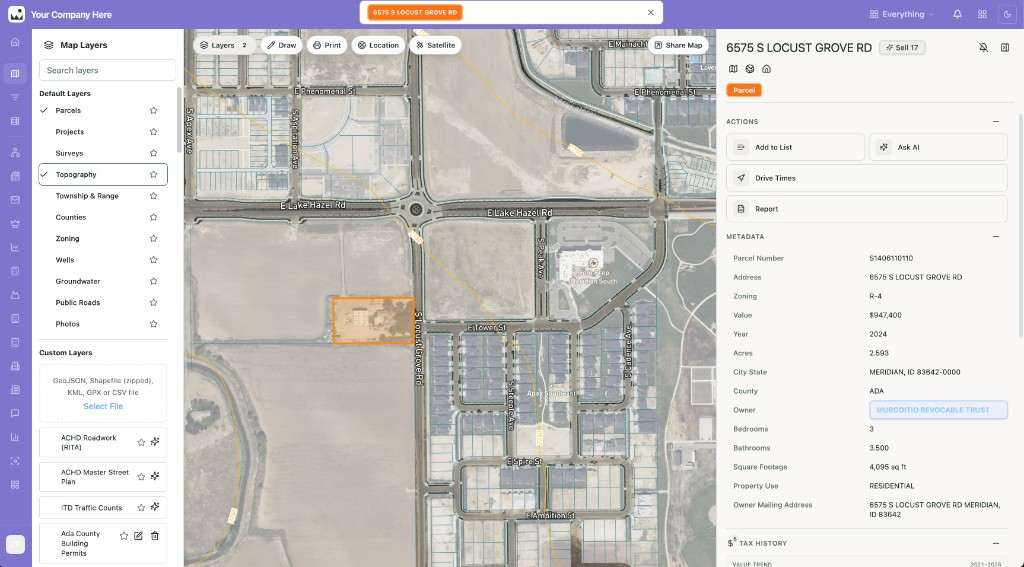
Permits to bid, subsurface before you trench, notices before you mobilize. Construction sits on the LandFlow data core — you are not exporting out of GIS to start the job.

  • Building permits as bid leads
  • Wells and lithology under the pad
  • 200+ Idaho GIS layers on the same map
LandFlow map with GIS layers for a construction site

A number you can defend
and a sheet the operator can run

CAD takeoffVolumes + machine hours
Cost report PDFOwn or dry-rent priced
Run sheetDay / hour / machine / operator
Fleet rosterOwned iron and rentals

Built for the people
who move dirt

From the estimator’s first DXF to the operator’s 06:00 start.

01
Civil contractors

Bid the site from the drawing. Know whether to own the spread or rent it for this duration.

02
Estimators

Earthwork, utilities, roadway, fuel, operators, and equipment in one rollup — not three spreadsheets.

03
Superintendents

Hand an operator tomorrow’s hours. Staff the board from the same clock the bid used.

Get started

Bid the next site
from the CAD file.

Walk a DXF through takeoff, own-vs-rent, and an hour-by-hour run sheet on your own job.

Book a Demo → Get Started

Idaho civil · conceptual estimates, not a guaranteed bid